Microsoft Family Safety Not Working: 5 Quick Fixes
Restore the app's proper functionality with a few tweaks
 5 min. read
 Updated on
Share this article


Improve this guide

Read our disclosure page to find out how can you help Windows Report sustain the editorial team Read more
Key notes
- Many users claimed to receive the error There’s a temporary problem with the service. Please try again. when trying to use the Family Safety app on Windows 10.
- In order to fix this issue as soon as possible, you should restart the device you are using.
- Sometimes your antivirus may block certain apps from running, so make sure you disable it.
- Updating your OS can only bring you benefits and get rid of many bugs, so try it out now.

Microsoft Family Safety is a very useful app when it comes to protecting your loved ones in your digital life. This is a free tool available for Windows 10, Xbox One and Android devices.
The Family options in Windows 10 are very useful as they allow you to create another account or a child’s account that you can control and get reports about their activity on your PC.
The Family Safety option lets you set additional limits, as well. But a number of users have been complaining on the forums that the feature isn’t working as it should be.
Some Windows 10 users claimed that the app is not working and the following message being displayed: There’s a temporary problem with the service. Please try again.
I have three younger sisters, all three have the same make and model of Toshiba laptops. We have family safety set up on all three laptops but only two of them work correctly. The two that work block the internet and give feedback on activity. My youngest sister has family safety set up exactly the same but she has full access to the internet and it will not give feedback on activity. The administrator on her account has a local account, she does as well. I have a different laptop and I have a Microsoft account.
In the following, we’ll try to offer you a series of solutions for this problem, so read on to fix it with ease.

Secure your devices with award-winning cybersecurity technology.

Maximize your PC's security and performance with top-notch digital threat detection.

Keep secure with groundbreaking AI detection and prevention technology.

Browse the web securely for up to 3 devices across Windows, Mac, iOS or Android systems.

Best security tool for intense browsing activity.
What can I do if Microsoft Family Safety is not working on Windows 10?
1. Restart your device
The first and most obvious step that the person who is having similar issues needs to do is to restart the device. If that solves your problems, then it’s great; if not, read further.
Other factors to consider before moving forward:
- Make sure that the kids you choose to monitor each need a standard user account
- Set up a new child account and setup the limitation in Family safety to check the result
- Use the Clean boot mode to check whether a security block could be the culprit
2. Disable your antivirus/ firewall
If the issue persists, try disabling your antivirus temporarily and see whether that has any effects. Turn off the firewall as well.
Another cause for issues with the Family Safety app on Windows 10 can be your antivirus software. Sometimes your antivirus can block certain applications from running.
So, be sure that the Family Safety app is added to the list of exceptions in your antivirus. If this app is blocked by your antivirus, perhaps you can fix the problem by disabling your antivirus.
Certain antivirus tools just aren’t compatible with older software, and if you’re unable to run the Family Safety app, try removing or disabling your antivirus.
If removing the antivirus solves the problem, this might be a perfect moment for you to consider switching to different antivirus software.
There are many great antivirus tools on the market, but if you’re looking for a reliable antivirus that won’t interfere with applications such as Family Safety, feel free to try out the one mentioned below.
⇒ Get ESET HOME Security Essential
3. Verify your Microsoft Family account
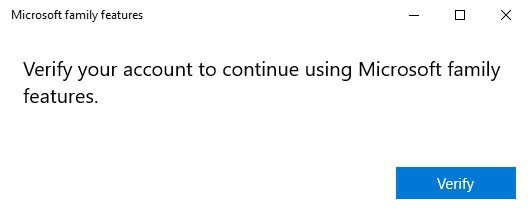
Take the problematic device and go to Microsoft’s support page to fix account issues that may be causing this error.
Your child’s Microsoft account may periodically expire on their device. When this happens, activity is not sent from the device and various errors and issues may occur.
The quickest way to fix that is to verify the account, so be sure to check it accordingly.
4. Update Windows
- Go to Start, and type update.
- Double-click the first result to open the update section.

- Now, click on the Check for updates button, and install the available updates.
- Restart your computer and check if the issue persists.
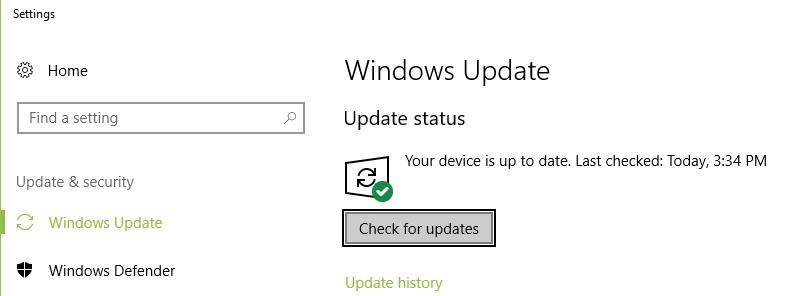
Microsoft periodically release new Windows 10 updates in order to improve system stability, add new features and fix the existing bugs.
As a matter of fact, the latest Windows 10 OS version brings major improvements for time limits and activity reporting.
If it’s been a while since you last updated your Windows 10 computer, check for updates as soon as possible as this action may solve the Family Safety app issues that you’re experiencing.
5. Check the control level
- Press the Windows key + I to open the Settings app.
- Go to the Privacy section and select Feedback & diagnostics.

- Set the level to Optional diagnostic data.

If you can’t see recent usage data from your child’s device, it most likely the Family Safety app is working properly, it’s just that the control level is not appropriate.
The parental control software is a must-have if you want to protect your children online, so be sure to check out our best parental control software for Windows 10 list.
Did any of these solutions help you fix the Microsoft Family Safety not working problem? Let us know in the comment section below.