Are you excited about Windows 8?

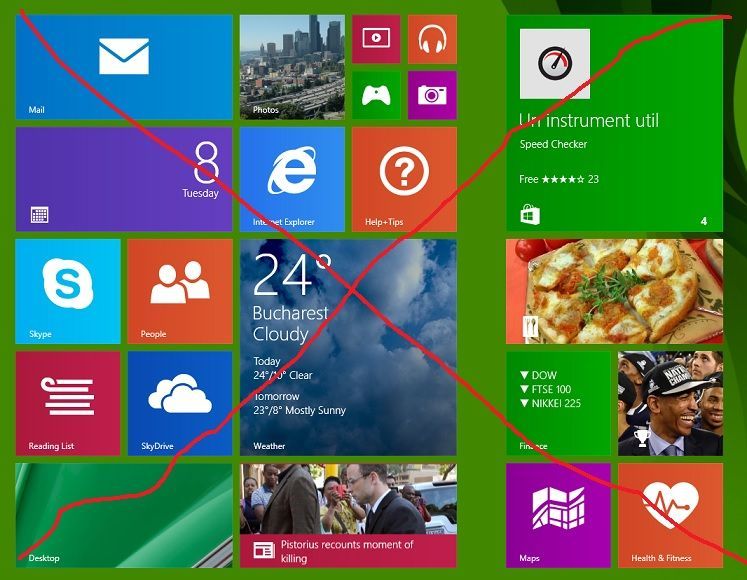
windows-8-logoThe Windows 8 Release Preview, with improved Metro style apps, a modified (and soon to be gone) Aero interface in the desktop, and lots of bug fixes and revisions became available yesterday.  While we’re still not convinced that Windows 8 improves a desktop non-touch experience enough to move up from Windows 7, and as of yet we can’t buy a touch enabled Windows 8 laptop or tablet with a compelling enough set of features to make it worthwhile, we’re making the leap of faith and running full blown Windows 8, and learning our way around a new way of doing things.

Are you?  Is Windows 8 getting you excited?  What are your experiences so far?  If you’ve been running Windows 8 from day one, or just now getting around to installing the Release Preview to see what all the fuss is about, we’d like to hear what you think.  We’ve posted a poll in our sidebar, and would love to hear what you have to say in the comments.

For non-touch users, using Windows 8 seems to require a greater reliance on keyboard commands – we’ve found that hitting the Windows key is much easier than trying to zero in on the lower left corner of the screen (especially with a dual monitor setup, where the left hand side of the screen isn’t anchored).  Alt-tabbing has suddenly become more important, and we’re on the lookout for more useful shortcuts.

At Build last year, when we were allowed the use of one of the developer tablets running Windows 8.  We found that even in a laptop-like mode, using the provided keyboard and tablet stand, that combining touch and keyboard was simple and intuitive, so much so that we quickly began touching our (decidedly non-touch) laptop’s screen after only a few minutes use of Windows 8.  Windows 8 is made, and meant, for touch.  But can it work in a desktop only environment.  So far it’s a struggle, but we’re beginning to get retrained.

Windows 8 is decidedly faster (and easier on battery life) than its predecessors, and we’re enjoying that right out of the gate.

The apps formerly known as Windows Live are growing on us, too, although there’s something distressing about having a full screen messaging app running while we just *know* we’re missing something important on the desktop or in the browser.

But these are only quick first impressions after only a few hours of real, regular use.  We’re hoping to learn to love Windows 8 on the desktop, but there’s definitely a learning curve.

So what do you think, are you loving Windows 8 right out of the box?  Let us know.


  • http://www.facebook.com/robinvanveghel Robin van Veghel

    Well i wanted to install it, but found out that some of my programs are not compatible yet en dat if i install i would have problems with my ‘Secure Boot’ which I have no idea what it is. So for me im still happy using Windows 7

  • fleon888

    Yes and no. I’m pretty excited about the look and feel … on a tablet. On the desktop, I’ve been running it since the first CP and am still pretty aggravated by many of the changes. The metro animations are extremely distracting.

    • cmwind

      I know it seems like its kind of defeating the point… but I actually am somewhat aggressive about either shrinking the tiles so that they are smaller (so mail as an example it only shows me how many new emails I have instead of constantly having it flip up with who the new email is from) Photos I set a particular picture so it is not constantly shuffling between random photos.

      That said like I commented below windows phone does not have this problem because you have different style animations that are much more fluid/graceful?/or maybe elegant?

      either way Windows 8 just has one type of live tile animation and when that one animation (quickly sliding up and out) is happening on 10 different icons its quite obnoxious… they need more gradual fading and flipping over style animations… instead of just up and out

      • fleon888

        You can do that :) Pull down on the tile to open the bottom menu. Click “Smaller” and you end up with an email tile that just has a number for unread.

        Helpful? :)

        • cmwind

          right… that’s what I was saying I do (so not helpful) but thanks anyways :)

  • cmwind

    been using win8 on my laptop since dev preview launched. consumer preview was vastly better and used it on my laptop and desktop both. now the release preview has brought mature apps which makes the whole experience better. between flash in Metro IE and the more mature apps I don’t think I need to use the desktop except for Office applications (and I would prefer that they came out with Metro versions of free, light, office web apps). Some apps need improvements for sure. And there needs to be more apps of course. But I can really see how Metro can replace the traditional desktop (that said its v. 1.0). I plan this fall to purchase a tablet/dock (that will always run Start) and run that out to a larger monitor (that will primarily run desktop). I do desire the Start Screen to run across multiple monitors in the future though.

    Things that concern me:

    Tile animation is inferior to Windows Phone 7.5 – WP apps have several different flipping and fading tile animations. W8 apps only have one: quickly slide up and out… particularly annoying how they have implemented this on the People and contacts pinned apps

    Messaging app does not allow for offline facebook messages, nor does it integrate Skype IM. It also does not give you a comprehensive list of online users… unless you have started a chat with them before
    People app does not allow pinning a “Me” tile, It has no “group” support. It has “favorites” which is the most useless categorization on any platform facebook, windows live messenger, AIM… nobody ever uses “favorites” cause its way to generic give it up already

    Bing Maps does not allow pinning of specific locations as a unique tile. Nor does it have a way to save locations. Nor does it auto transition between aerial and non aerial views when you get closer/farther

    IE only allows you to “pin” favorite websites meaning that any website that gets pinned as a favorite also automatically gets a tile on the start screen. if you remove the tile on the start screen you remove the favorite/pin in IE… terrible!!!

    also in IE when you pin unique web pages as unique tiles on windows phone it has a nice image of the actual website that you can sort of tailor to however you want it… not so in W8 you just get a big tile with a small favicon of the website in it… very ugly

    those are my biggest complaints… I just don’t get why or how some of the win8 apps are lagging those of windows phone

    • Damaster – LiveSide.net

      let me add to that list:
      - Calendar doesn’t actually pull in Facebook Events – something Windows Phone already does.
      - People doesn’t allow you to manually link contacts together. Oftentimes my contacts name themselves differently across various social networks (especially Twitter ones), and so I get two of the same contact that wasn’t automatically de-duplicated.

    • http://cid-280a1538334a1cb9.profile.live.com/ Seika

      [removed]

    • cuz84d

      desktop is still needed to actually manage content, etc.. like having the metro app be the default open behavior of photos when you browsing the file system from explorer actually is counter productive but explorer is much nicer to use with the quick detail or thumbnails buttons, and I find that since breakcrumb navigation is in place, I actually still don’t use the Up button that much. But clicking on content in Music/Video/Photos excetera is ok just as good to use in Metro. But I still would want to run Zune and Windows Photo Viewer at times. I really would like an Explorer Metro app.

  • http://twitter.com/dustbeta Dustin Schultz

    I am very excited. But for some reason the release preview won’t install on anything so far. Consumer preview worked just fine so not sure what is going on.

    • cuz84d

      I think there must be minimum support for hardware still like for the Bios type.

  • Andrew_ww

    The only way I am going to use Windows 8 is if I buy a new PC. I doubt it will happen.

  • http://www.facebook.com/profile.php?id=744916256 Ryles Malone

    Hmm, I’m excited about the future of computing, and I’m excited about a unified experience between PC, TV/XBox and Phone. I’m excited for Windows 8 and the first steps toward the future of computing. I’m thinking in 10 years, when we forget all about Windows 8, I think we will remember this as a milestone where computing systems across different devices started to become unified. I’m sure we’ll remember it as a sketchy start, but concepts that led to innovation that bridged all our computing devices.

    • joop

      well said!

    • Guest

      That’s my feeling too. This feels like a plumbing release, with the next one being the actual fully functional one. I just don’t see enough in this one for most to bother with, at least desktop users.

  • http://gregsedwards.wordpress.com Greg Edwards

    I’m still tinkering around with it on a PC at work that can’t get outside the corporate firewall. I’ll have fun with it this weekend. One issue I had noted with the CP was that I couldn’t get an OSK to appear in the Metro UI, even when no physical keyboard is connected. I’m curious whether that works any better in the RP.

  • http://www.OfInteresttoMe.com/ Matt

    Heck yeah I’m excited!

  • Mario Albertico

    I’m in the “tablet? yes! give me a Windows 8 tablet! desktop? No thanks! I’ll keep Win7″ boat… I tested the CP on a secondary laptop for maybe a month before deciding that I desperately wanted Windows 7 back enough to perform a full factory recovery. It had its fun bits, but, at least the CP, just kept reminding me of how easy and fast a tablet experience would be compared to my annoying trackpad life. It seems like the Release Preview has some improvements there, but I just got back up and running in Windows 7 so no Windows 8 for me until launch and an affordable Nokia tablet hits the market.

    • cuz84d

      dual boot, dual boot

      • Mario Albertico

        Haha, I suppose it might come to that if I really want to tinker with the final release.

  • JohnCz

    Windows 8 improves upon Windows 7 in almost every area but I’m most excited about Metro apps and the PC hardware that will be coming out to enable them.

  • Sugadevan

    Already installed win8 RP, its awesome , fast, improved, I like metro and ya im excited :)

  • JoshMiller

    I was using the Beta for a while and tried to keep things optimistic but quite frankly, the experience is awful and I finally went back to my normal old experience. I use Keyboard commands all over XP and 7 but Win 8 just geels overall conpletely inefficient on a desktop/laptop.

  • http://doctorwhofan98.wordpress.com/ doctorwhofan98

    Windows 8 itself is great (and I’m running it solely on a mouse/keyboard machine!), but the only problem I’m having is with my Dell running the Release Preview – whenever I try to shut down, a ‘no disk’ winlogon.exe error appears, and stops me from shutting down. I hope Microsoft fixes this soon.

    • cuz84d

      try reporting it and your hw configuration. Its possible its just not that compatible as I found with a dell Dual core 2 D600

      • http://doctorwhofan98.wordpress.com/ doctorwhofan98

        I have created a Microsoft answers post about it, and at least 12 other people have clicked the “I have the same question”. It seems it is quite a major problem.

  • http://twitter.com/TheRealScottR Scott Roberts

    Looking forward to it, but disappointed that you appear not to be taking advantage of CableCard technologies and improving Windows Media Center. I want great ways to access all the media I already own, not just stream and download stuff I buy.

  • DWill

    I’m very excited…and I’m sure everyone will upgrade once they find out how awesome Apollo will integrate with the OS & Xbox 360 over the next few weeks.
    Lets be honest, we’re all fanboys to some degree if we’re reading Liveside on a regular basis .

  • narmez

    yes

  • Simon Johnny

    I put RP on my Dad’s PC yesterday. He’s really excited about it. Keep in mind that he’s 70 in a few months and he’s not exactly the brightest anymore. Here are a few I noted from him;
    Why can’t he change the wallpaper anymore? He ment the background on the start screen since thats now where the PC tends to be when he’s finished working in a app. So as he sees it, the start screen is more then a replacement for the start menu, its replaced his desktop experiance and as a result he’s lost the ‘fluff’. In this case, it was a picture of his wife on the wallpaper.
    Even at his age, the basic apps didn’t provide enough for him. Maps was useless, no pinning options for place, no way to search a location by address. Photos didn’t provide any easy way of him finding his pictures he has. Even with a handful of pictures the current pictures view is very limited and he said it’d take him for ever to find what he was looking for.
    He’s actually gone back to using his web mail rather then the built in mail app. even for the little use his has for mail, it didn’t provide enough functionality and the gui design is terrible. The compose message had no real design to it, there was no him to what was the subject and mail body areas to type in.
    And the messenger application.. no support of sending or receving files, pictures. No way to change the font or size of the text. The blinding white areas with black text, and then the ease of access option for make things big just makes the entire GUI big as well, making it an even worse experiance.
    The UI designs don’t seem to follow any actual guide lines with navigation buttons being placed at the top right, some times top left. Sometimes no back button at all, just a cancel button. We have no dedicated back button on a PC.
    The metro browser is quite silly. With no way to import his favorites, I spent what seemed like 2 hours with him, flipping back and forth from the desktop IE copy and pasting the URLs. and then pinning them to the Metro start screen. When he now, tried to compare two or three sites, he’s having to go back to the start screen, find the bookmarked tile (easy 50+ of them by now) and then go back to metro. By that time he’s lost his train of thought.
    I’ve given him week to see how he gets on with it. He’s actually dealing better with the change then I expected him to. He grasped the concept of just putting the mouse into the corner and clicking quickly, but the charms menu because it doesn’t work throughout all the apps just confuses him at the moment.

    • cmwind

      there is actually a technical reason for why pictures are not allowed as backgrounds on the start screen… they go into a ton of detail about why on the building windows 8 blog (I know that does not necessarily “matter” to your father who might just expect to be able to do something like adding a background he has traditionally been able to do in the past) but for what it’s worth there is a reason

      I would also note that even though this is a release preview for windows 8, it is not a release preview for the apps. they have already significantly updated many of them in just a few months since consumer preview and will have another 6 months or so before any hardware hits the shelves.

      and charms do pop up across all apps… even on the desktop but not all apps that should use charms are using charms (for instance you mentioned messaging would benefit from use of the “share” charm). and of course charms to almost nothing on the desktop

    • cuz84d

      problem is people need to start thinking of this thing like an Ipad and android and windows phone. There is one search option that works for all use cases, etc. I do miss the ability to create a start screen wallpaper too. I miss IE favorites, but pinning was easy, like 5 minutes to know they were on the start menu.

    • http://doctorwhofan98.wordpress.com/ doctorwhofan98

      Keep in mind that the Mail, Messaging apps etc. are still technically “App Previews” (you can see the title at startup) and they may change before the final release. IE10 metro still does support the viewing of Favorites (but not creation) – you just start typing the name or address of the website and you can see it has been Favorited. Also, with pinned sites, they act just like apps so you can just start typing the name on the Start screen and hit enter.

  • http://hugsmile.t15.org/ Geoffrey De Belie

    Well I dislike Windows 8. It’s heavier than Windows 7 and I even can’t use the desktop as a full environment. Metro is not user friendly at all (where is the close button?) and the preview of the starting app could be much better (for example the previous state of that app) I stay with Linux Mint Debian.

    • Simon Johnny

      To close a metro app you swipe down from the top of the screen. The same is done using a mouse… or you can middle click on the app list from the top left side.

      • http://hugsmile.t15.org/ Geoffrey De Belie

        A close button would be too easy. Or a good task switcher. I still don’t like win8.

        • cuz84d

          alt-tab still works across metro and desktop. close button would be nice yeah, I miss that especially for photo/video viewing. instead you have drag the app down the screen from top to bottom to close it. its good for fingers, but people want Usability. I think they want to make it more phone like. Or open the task switcher and right click close the app. Or go to the new Task Manager and close the apps there, but they are suspended in the background by default for a number of scenarios.

  • Chris

    ask me again if it becomes a huge hit, I’m talkimg about the non touch environment, what 98% of Windows 8 users will be using.,

  • http://www.facebook.com/people/James-Portelli/683592092 James Portelli

    I have been using Windows 8 since the Developer Preview. I have found the OS faster than Windows 7 on a 4 year old Desktop. The system boots in a matter of seconds and I loved that. I don’t miss the Start Menu at all but the Metro Apps are still crap even in the Release Preview. I don’t like the mess programs are doing on my Windows 8 start screen. For example installing Office 2010 will lead to an army of new useless boxes on the Start Menu. This looks really shabby for a 2012 OS.

  • Mark G

    I have been running Win8 since the
    moment a preview was available as I’m sure everyone here has. I enjoy tinkering
    with new things and get bored pretty quickly with the same old thing so I have
    been truly enjoying Win8. That being said I am starting to think this will be
    the next interim OS like Vista and Millennium.

    I say this because I just don’t see a compelling
    reason to deploy this OS widely. I manage IT for a number of companies. As I
    work with this new OS as a professional I see there are certainly a number of performance
    improvements but nothing that would justify the expense of upgrading throughout
    a company. The cost related to retraining alone would be prohibitive. I think
    Win8 adoption will take a very long time.

    The one thing I see in Win8 that excites
    me is the concept of policy controlled tablets. I would very much want to
    recommend this to my clients however there is a problem… the “Store” is a waste
    land. Tablets in the business are driven from the top down, by executives. They
    are influenced by the world outside of the business. When they go to meetings
    and conferences they all compare tech and everyone wants the newest coolest. No
    matter it will be used for business it better have Pandora, Words With Friends
    and Angry Birds.

    The tablet market will fall flat if the
    Metro apps are not plentiful and at least as good as you can get on an iPad.
    For example, I have better email functionality on my Windows Phone 7 than is available
    as a Metro app in Win8. I would expect better functionality from an app running
    on a computer but so far I still can’t add my Yahoo account and God forbid a signature
    let alone separate signature for each account.

    I am a Microsoft fan and I hope this
    works out but for now this looks like business as usual. Pretty much the same
    conversation we all had when Win7 RC arrived.

    • cuz84d

      Actually this will be the first tablet release of windows that will actually be a joy to use.. unlike everything else since 2000.

    • hwangeruk

      The compelling reason for IT is simple. Its an iPad alternative.
      The big news is that Win8 convertable notebook/tablets will be everywhere.
      See Computex, there was nothing else there except Convertable Ultrabooks.
      Intel have invested $$$ in display companies to meet demand.
      Win8 “must” confront iPad/Apple. Intel must slay ARM.
      Consumerisation is driving IT. IT departments are having to adapt. Its a tough time for IT who are still tasked with data protection, and security but are giving in to demand for all sorts of devices (unmanageable ones) from executives.
      [BTW, this is why MDM "Mobile Device Management" is the topic of the month for IT managers. Symantec, McAfee, Airwatch, Mobile Iron, Good - all clammering for your business to manage this new mixed up world]
      Win8 gives IT departments their life back. Same Windows technology, total compatability, a tablet when its needed, and notebook when real work needs creating. All with the same management tools, security layers and dev toolset.
      Win8 gives company staff what they want, a company paid for device for their consumer life, but a device that does what they need to at work. Its genius. Just most people haven’t heard the penny drop yet :)

  • someoneinwa

    I was struggling with the Consumer Preview. The Metro apps were nothing more than proof of concepts with such limited functionality that I stopped launching them at all aftera few weeks. I am a big Metro fan and so I was really underwhelmed by the Start Screen experience as well: the colors were dull, and the tiles were barely “live.” Again, the proof of concept was there, but just not useful. The Release Preview has changed all of that. The Start Screen is now the positive experience I expected it to be. It is amazing what a few more vivid colors, some tweaks of icons and the some new spunk in the tiles can do to change the experience. The original Metro apps barely resemble their predecessors and are now attractive, well laid out (for the most part) and useful. The mouse navigation has become much improved and those side edge gestures have gone from awkward to easy. I still haven’t tried the beta on a touch device, but I am excited about Win 8 now where before I was merely curious.

  • B_Sack

    Very.

  • frankwick

    excoted yes and no…
    I’m excited from a personal level becuase I think it is fantastic when you use a touchscreen.
    I’m disappointed as crap on a professional level. The simple fact there is no start menu and start menu is going to prevent me from deploying to my 7000 corporate users. I would be lynched if I unleashed that beast..

    • cuz84d

      It would be nice if they just left that start orb/menu on the taskbar at least for this release for IT I guess, but so many companies deploying windows 7 I think that they usually skip OS cycles anyway, so MS is not counting on Enterprise windows 8 deployments to happen as they have for windows 7.

  • http://twitter.com/ChrisK91 ChrisK

    I really like the Overall experience of Windows 8. Everything works fast and fluently. But at the same time I could not really get the hang of the metro interface. I simply can’t integrate it into my workflow. Most apps I use run in desktop mode. So when I want to listen to music I currently use the Zune Software (I also own a WP7). When I’m working or when I’m gaming and want to change playlists I can just open Zune and change playlists with a few clicks. When I use the metro app instead of Zune I’m always presented with this big grid that doesn’t seem to be optimized for mouse usage. When I want to scroll I have to use the tiny scrollbars at the bottom, but I’d like to drag the screen with the mouse. Would make things much easier. Another thing I can’t really use is the new start menu. I’m usually on the desktop because the information density there is much greater then it is with 10 tiles. Also my start menu is a mess, because there are small application tiles (for instance from Office) and some gigantic live tiles. But I don’t usually see the live tiles because I’m not that long on the start menu because it isn’t effective on my non-touch-enabled Laptop. I guess I have to keep working to integrate Metro in my habits. But I’ll definitely try to get a small convertible with Windows 8.

  • cuz84d

    I like being about click on apps with easy and pull stuff up than trying to navigate with a mouse and keyboard together and having be so precise. Take for example news/weather/sports/travel/messenger apps the hit target is better on Metro apps than a browser and its faster than waiting for one webpage to load with a ton of ads on it.

  • http://www.facebook.com/luisotoni Luis Felipe

    No, I’m not excited about Windows 8! It’s terrible!!!
    My personal experience with the Windows 8 Release Preview is:
    1) I can’t get notifications when my contacts signs in Messenger… So I have to use desktop to receive this notifications…
    2) I can’t configure POP or IMAP account to use in Mail… So I have to use desktop to use my work account…
    3) I can’t see Flash in sites… So I have to use desktop to see these sites…
    4) I can’t update my status in Facebook/Twitter with People app…
    5) I can’t organize Favorites in folders… So I have to use a browser in desktop to do that…
    6) There is a lot of apps about news, but no one runs like a RSS Reader that allows me to select just the sources I want…
    7) When I use Music site (like Youtube, TunesAccess) to play music in Metro Internet Explorer and changed to another app, the music stop to play and also I can’t use Google Street View with IE in Metro… So I have to use a browser in desktop to do that…
    8) I can’t continue working quickly in documents I recently used because there is no Recent Documents view…
    9) Start Screen doesn’t organize my apps based in “Frequently used programs list”
    10)I have to click more to view results for Settings, Files and Programs, and in Windows 7 this was not necessary
    11) I have to click twice to change a Tab in Internet Explorer in Metro…

    If I had time, I find many other horrible things in Windows 8, but this is enough to keep me away from the interface Metro.
    If i just had this features in Metro I definitely would change to Metro… but for me it is a throwback to use Metro…
    I hope that Microsoft does a good job and include at least these functions in the Metro