
Wave 3: Windows Live Messenger 9 Beta – What’s New? A Comparison With 8.5

You probably read about Windows Live Messenger 9 (Wave 3) on here before but let’s take an even closer look. What are the changes compared to windows Live Messenger 8.5?

The Look (and visible features)

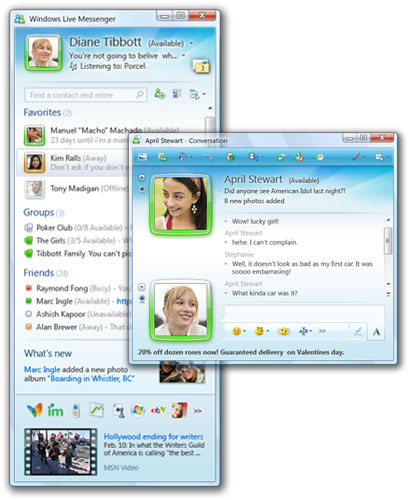
The first thing you will notice of course is the completely different look:

 MsgrMain
[Windows Live Messenger Main Window – 8.5 (Vista Business) and 9.0 (Vista Ultimate)]

What we notice first in the above is that the buttons for Shared Folders, Live Space, MSN Today and Mobile have disappeared. The only thing familiar that’s left in the top part is the Mail button, and that one has moved to the right. So where have they gone?


Msgr-hoverDP

This is what we see when we hover over our own DP. There they are! Well eh most of them anyway. Online files what? Yes Online files, not Shared Folders

MsgrOnlineFiles
See they did think about the sharing folders we already have on our computers too, can’t just get rid of what we already shared now can they! The new thing will be sharing your files online with Skydrive (not working yet, Page cannot be displayed).

We are also missing the tabs (really? do you use them?). Apparently they moved to the bottom even though at the moment I only see Today (MSN Butterfly) there. If you look at the picture Chris posted before you see more of them.
Msgr-MainBottom 

And what happened to the buddies in our contact list? They have been replaced with colored blocks. The colors stand for your contact’s status:


Msgr-statuscolors

You also see this coming back in the DP rims (your contact’s and yours), they color along with status too. As you also notice the number of statuses has been reduced to 4, no more “Be right back”, “In a call” and “Out to lunch.” Online has been renamed to Available.

Msgr-rimstatus

In addition to the changing color for the rim in appear offline the DP will also fade.

Hey, I see the brush appear there in the top corner! It’s hidden there till you hover over the header, so what is that for? We are used to it for changing our Messenger’s color scheme. Well we can still do that but there’s more! Scenes!

Msgr-scenes Msgr-convo

Changing the scene will change the look of the main screen, but it won’t change the look of the conversation screen. Why won’t it? Because your contact’s choice of scene will determine what that looks like, a few examples are shown above. In addition to the themes available you can also drag and drop your own picture in the header, this will also be seen in your contact’s conversation screen.

MsgrHeadercustom

Just as with DP and Personal message this will be stored in the cloud if you have Messenger set to use the same display picture and personal message wherever you sign in ( Tools > Options > Sign In tab under General).

We already noticed the black transparent box when we hovered our own DP, you will see the same look come back when you hover over your contact’s name in the contact list:

Msgr-contcard 

In this screenshot you also see the What’s new feed. This will rotate the What’s new feed you see on Live Spaces, you will be led there if you click on the What’s New link, and also inform you when people change their DP or personal message. We also see Scott is playing a song…now that’s nothing new but what is new is that you can display both your Personal Message and Now Playing at the same time!

Msgr-psm NP Msgr-PSM npconvo

Here you see the header in my main screen (where contact list is) with Personal Message and Now Playing and the convo header I saw when messaging Scott earlier.

Let’s look at the Main windows some more, there are two features that were not present in Windows Live Messenger 8.5, namely:

Favorites:

MsgrFav

Neat, now you can have the ones you speak most to at the top at all times, no more searching through the contact list. Though I use the contact search bar for that.

Groups:

MsgrGroups

Groups, isn’t that how we sort our contacts? It was, yes, but now that is called Categories. Groups is new and is to create a multiple person chat that will stay till you delete the group. Each group can hold up to 20 members.

Msgr-group

Not everything is functional yet, everything under the Group button is grayed out (Group Website,  share Photos, Share Files, Discussions). After you created your first group the link/Category will disappear, don’t ask me why…it’s not logical at all but well eh if you want to create another group right click an existing group and choose “Create a group.” A group will look like this in your contact list:

Msgr-groupcontacl

Leaving a Group is done by right clicking on the group in the contact list and choosing “Leave this group”

Msgrleavegroup

You can also convert a category to a Group by right clicking on said Category and choose “Convert to group.”

I mentioned the contact search bar before, huge improvement there too: previously we had a search bar for Contacts and one to search the web, now these are integrated into one! Yay! Saves room!

MsgrSearch

But..but..wait a minute…what’s that button there in the middle? I never saw that before in 8.5, let’s investigate, it says Change contact list layout…

MsgrLayout

Now that’s way cool! We can now choose whether we want to show a DP in the contact list or just the colored block…and for both Favorites and Other! Can even vary with the size of the DP. Labeling can be done by “Display name” or “First and last name” and organizing by ”Categories” or Online status. We also see the return of what we saw so briefly some when in a previous beta: sort within categories by status! They also speak of SMS contacts, shouldn’t that be Mobile? They are grouped as Mobile anyway.


New Applications and (not directly visible) Features

Multi Point of Presence (MPOP)
You can now be signed in in different locations and receive your messages on all those locations

MsgrMPOP

Alerts and Sounds
Those both got their own tab now

MsgrAlertsSounds

For all of the events you can set one of the sounds that come with it or add your own sound:

MsgrSounds

Ever wanted to let your contacts know vocally that you are online? That’s possible too, we call that Signature Sound:

MsgrSigSound

Now first time “Turn on Signature sound” will be grayed out and you can’t enable it by just checking the box, don’t freak out over that (it’s confusing I know), just click the Change sound button and set a sound. You’ll see it’s enabled after you did that. Then next you can disable/enable as you normally would. Again here you can also set your own, so be creative! Getting sick and tired wondering where all those sounds come from? They’ve thought about that too, check “Mute my contacts’ Signature Sounds.”

Hold on! What about a setting a special sound for your contact instead of listening to the ones they’ve set? You can do so for sign-in sound and message sound if you right click on said contact in the contact list and choose “Choose sounds for this contact”. Here you will again have the choice of either setting one of the sounds already available or adding one of your own choice. You can set a different one for each if you want!

Photo Share
A new application is Photo Share. You start it by clicking on the Photos button in the conversation window. Next you browse to a picture you like to share and Click on Open. You will see the application load inside the conversation screen:

Msgr-Photosharing

Scott asked a good question there and unfortunately I didn’t find how to save a shared picture either, am I overlooking or… If not there that would definitely be something to ask for before it goes final!

Note: If you try to send a screenshot with paste it will add it to Photo Share or start Photo Share instead of sending it.


How does Messenger integrate with other Windows Live Applications and Services

We already know we can open up either Hotmail or Windows Live Mail directly from Messenger but there’s more under the hood. Think about directly going to your Live Space and Skydrive (Online files), watching your friends profile or sending him/her an SMS. The search bar is powered by Live Search. And what about the new What’s New Feed, that’s also closely tied with the feed on spaces. Surely with Groups we’ll see even more integration with the web…

This is still a beta and things may or may not work (already noticed a few here) and things can still change too. I may have even forgotten or overlooked things, please let me know if I did in the comments below, thanks :)

MsgrAbout


Updates:

I forgot something quite visible and new :O
You can now hide the toolbar at the top, look at the arrows I’ve put a white square around.

 MsgrHide

Should you ever want to hide display pictures or hid them by accident and want to show them again, there’s an arrow to do that on the left side of the conversation window too, just hover towards there and it will appear.

Links
- Links (including mail button) now open in the default browser.
- Links in the contact list and conversation headers are clickable.

Display Pictures (Tools > Change display picture)
- You can now have an animated display picture, it will take GIF files. Thanks BV2312, I completely forgot about that one already. 
- You can create your own display picture from webcam snapshots.
- Create your own dynamic display picture with Mood tiles:

moodtiles

This requires a webcam. As you can see you assign an emoticon to the picture so changing it is as easy as putting in one of those emoticons in your conversation.


New Windows Live Betas – Download Wave 3 Now! 

Read more LiveSide reviews:

Wave 3: Windows Live Movie Maker Beta

Wave 3: Windows Live Mail – Calendar, Calendar, Calendar (and more)

Wave 3: Windows Live Writer – A First Look

Comments

  • http://ranpha.wordpress.com ranpha

    Cease and desist letter in 3… 2… 1….

  • http://www.liveside.net/members/surilamin/default.aspx surilamin

    Excellent post Sunshine…I really enjoy the new messenger, I think MS will be well on their way to gaining some serious marketshare after Wave 3 is completed.

    Is the calling feature improved or different in any way? I installed everything this morning but, haven’t gotten a chance to test everything…

  • http://www.liveside.net/members/BV2312/default.aspx BV2312

    Yeah I miss Tabs already, I use it for Windows Live Alert (which they still need to update :@)

  • http://www.liveside.net/members/Janis91/default.aspx Janis91

    does anybody know a method to make ALL conversation windows have at least the same color as the main window? clicking on standard color doesn’t have any effect and would be too much to do this with every one contact. could someone help me?

  • http://www.liveside.net/members/BV2312/default.aspx BV2312

    MPOP doesn’t work with Pocket PC Messenger 2003 and using mim.live.com (Mobile Messenger)

    Plus display picture like GIF files now…

  • http://www.liveside.net/members/ScottIsAFool/default.aspx ScottIsAFool

    @bv2312 MPOP will only work if all clients trying to connect are using the same protocol version. Messenger on my Windows Mobile device kicks me (which is why i dont use it). Once Messenger 9 goes final, it wouldn’t surprise me to see the mobile clients updated.

  • http://www.liveside.net/members/BV2312/default.aspx BV2312

    @Scott thanks!

    I want a new Windows Live for Nokia!!!! that syncs my contacts, e-mail and calendar. But also backs up my sms and mms messages! :P

  • http://www.liveside.net/members/Sunshine/default.aspx Sunshine

    Thanks surilamin :) Calling is something I haven’t tried myself yet either.

    Also thanks BV2312, I’ve updated the post.

  • http://www.nunoperalta.com nuno-peralta

    And you can do Dynamic Display Pictures with mods. You can create them when you change your display picture.

  • http://www.liveside.net/members/BV2312/default.aspx BV2312

    @Sunshine No probs!

    Any news on when we will get our chance at the new Hotmail, Skydrive etc? Or you can’t tell us ‘non important people’ ;)

  • http://liveside.net/members/nikhil_5F00_jain/default.aspx nikhil_jain

    What about the integration of Gtalk, Aim, Aol & all other major IM within Live Msgr. As It was said in past all these..!!

    any clue ..?

  • http://www.liveside.net/members/Sunshine/default.aspx Sunshine

    lol BV2312, I have no idea when that will be.

    @nikhil-jain: I haven’t got a clue..don’t recall such being said either though…

  • http://www.liveside.net/members/Contz/default.aspx Contz

    I don’t know if it’s only a problem of mine…Personal Animated emoticons do not work anymore.. only personal static emoticons work… The same for you?

  • http://www.liveside.net/members/vipwoody/default.aspx vipwoody

    Can’t I see my contacts sorted by email addresses? I don’t want them to remove this feature!! :(
    If someone knows where it is please tell me.

  • http://www.liveside.net/members/Khristopher/default.aspx Khristopher

    Custom emoticons don’t work.

  • http://www.liveside.net/members/Khristopher/default.aspx Khristopher

    Oh and sorting by status doesn’t work either, which is my favourite feature that was removed before. So glad they brought this back. I was begging for them to.

  • http://www.liveside.net/members/DN2004/default.aspx DN2004
  • http://www.liveside.net/members/DN2004/default.aspx DN2004

    btw anyone having issues converting categories into groups and also deleting groups?

  • http://www.liveside.net/members/CharlyAR/default.aspx CharlyAR

    Ugly. Ugly, ugly.

    I like the top area of the main window. But the contact list looks like my daughter made it with crayons…

  • http://www.liveside.net/members/Emmanuel/default.aspx Emmanuel

    Sorting by email is not in this new version

    How come sorting by status doesnt work? just click on the “change layout” button and select “organize” by status

  • http://www.liveside.net/members/Contz/default.aspx Contz

    @khristopher thank you! I hope custom emoticons will work again in the final version

  • http://www.liveside.net/members/mrx9898/default.aspx mrx9898

    @CharlyAR, way to put down ur daughters drawing skills :P. But the contact list is a bit plain.

  • http://www.liveside.net/members/Sunshine/default.aspx Sunshine

    @DN2004: thanks for the link. Looks like they changed plans…

    @Contz: They don’t work for me either, one of the things I discovered pretty soon :(

    @Khristopher: indeed sorting on status within Categories doesn’t seem to work, it doesn’t here either. Organize by Online status only sorts Available, Mobile, Offline..again here no sorting on status inside the Categories here.

    Guess that’s why it’s a beta tough, we can submit our bugs and suggestions (Send Feedback from Help menu, or for those in the managed beta on Connect) for them to make it better ;)

  • http://www.liveside.net/members/Emmanuel/default.aspx Emmanuel

    I dont see how sorting by status within categories doesnt work. Could you guys take a screenshot and send your contact list settings as well so I can take a look?

    edeleon-1@live.com

    I work at Messenger Shell @ MSFT, I am the tester for that part.

  • http://www.liveside.net/members/Alasdair/default.aspx Alasdair

    Some nice details…. i was excited about the whole Windows Live Scenes thing and how your contact can se your current Scene, but it doesnt appear to stay with you from computer to computer.

    Hopefully it will. And, even more hopefully, it will be used as your in-browser Scene too.

  • http://www.liveside.net/members/rgonzruiz/default.aspx rgonzruiz

    There’s also a new feature not mentioned: I’m using Google Chrome as my default browser and when I click the mail button I am no longer taken to an IE window, but to a Google Chrome window (meaning that it now opens your current default browser instead of simply opening IE)… I believe this is new and had been asked for since the dawn of time… Or did 8.5 have it and I’ve simply been living under a rock or something?

    Therese just 1 problem though (at least with Google Chrome, can any FF user confirm?),,, instead of opening my hotmail page (or simply mail.live.com) it opens some msn.com redirect page that unfortunately redirects to http://www.msn.com and doesn’t serve the right purpose… Well, I hope they fix this for the next build…

  • http://www.liveside.net/members/Emmanuel/default.aspx Emmanuel

    Sorting by status within categories sorts first all the non-offline contacts, this includes available, busy, away. so, from all those three states, the contacts are sorted alphabetically, then the contacts that appear offline come later, equally sorted alphabetically.

  • http://www.liveside.net/members/Emmanuel/default.aspx Emmanuel

    Launching the default browser is a new feature in version 9.0

    it did not exist in 8.5

  • http://liveside.net/members/ian_2D00_live/default.aspx ian-live

    You can now record your own display pic as well as an using your webcam – it’ll (presumably) saves it as an animated gif using a few frames. Nifty!

  • http://www.liveside.net/members/Sunshine/default.aspx Sunshine

    @Emmanuel: Mail sent ;)
    Updated the article again. Thanks everybody, keep them coming :)

  • http://www.liveside.net/members/Kittyburgers/default.aspx Kittyburgers

    Does anybody else find that it take too long to update the online status of online contacts. Sometimes I see the green glow around one of my contacts, and it say “away”, then sometimes the amber glow, and it say “available”. It seems to take time in refreshing, especially when the contact is in the “Favorites”. The normal small status display (with just the colored dot marker, seems to behave better.)

  • http://www.liveside.net/members/wideawakewesley/default.aspx wideawakewesley

    It looks like plugins have been removed from this release of Messenger. I used one on 8.5 to update my messenger status with my latest tweets from twitter. Is this a permanent thing or will plugins be in the final release?

    If permanent, this is a deal breaker for me and will mean me reverting to 8.5

  • http://www.liveside.net/members/Kittyburgers/default.aspx Kittyburgers

    I noticed the plug-in issue too. I was using Twessenger, a plug-in, and it has disappeared. There needs to be some sort of plug-in integration.

  • http://gregsedwards.spaces.live.com gregsedwards

    The IT department at my company blocked Messenger through ports on our proxy server, so we can’t use Messenger or Web Messenger. I have been able to get Mobile Messenger to work, but what a crappy workaround. They didn’t think to block a number of other IM tools, including Google Talk, but I want my Live Messenger. Any word on whether you’ll be able to choose custom network ports with this version?

  • http://www.liveside.net/members/Emmanuel/default.aspx Emmanuel

    Hello people, just to clarify something about sorting by status within categories:

    I treats available, away and busy statuses as one big status, therefore, all the contacts with some of this status will be sorted alphabetically and then the offline contacts

    So, the following contact order is correct when sorting by status within categories

    contactA (busy)
    contactC (available)
    ContactSomething (away)
    contactSomething2 (available)
    ContactZ (busy)
    contact1(offline)
    contact2(offline)
    contactz(offline)

    This was the behavior in 8.5 and we didnt change it, but now is more noticeable with the new contact control and the chiclet (the smallest icon). This is by design.

  • http://www.liveside.net/members/Sunshine/default.aspx Sunshine

    @Emmanuel: Thanks for your explanation but that completely defeats the purpose of sorting by status, esp. if you already tell it to show offline contacts in a seperate category.
    What we thought (and what users think) it is, is what we’ve seen briefly in another messenger beta: sort available, away, busy, offline..
    I really hope it can be changed to that, as I (and I know others too) really loved/will love that feature.

  • http://www.liveside.net/members/Kittyburgers/default.aspx Kittyburgers

    Here’s a shot of the status updating issue.
    Gosh, this release has been a disaster for me so far. I think I might have to revert back to 8.5. Video doesn’t work either, and sound is choppy.

  • http://www.liveside.net/members/Kittyburgers/default.aspx Kittyburgers
  • http://www.liveside.net/members/Emmanuel/default.aspx Emmanuel

    Thanks Kittyburgers, that is a known issue

  • Wobbler

    Anyone else having sign on problems… more specifically Error 81000451?